 Get Listed

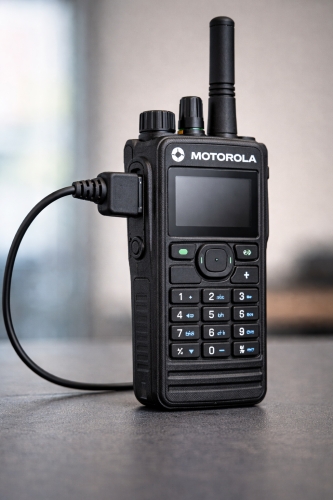
Choosing the right earpiece for your Motorola two-way radio should be a straightforward task. You find a headset, buy it, plug it in, and start communicating. Unfortunately, the reality is often much more complicated. With a vast array of models, connector types, and compatibility nuances, it’s surprisingly easy to purchase the wrong equipment.
Many professionals and businesses waste time and money on earpieces that simply don't fit or function with their specific radio models. Whether you are managing a security team, coordinating a large event, or upgrading your construction site comms, understanding the intricate landscape of Motorola connectors is crucial.
In this guide, we will break down the most common mistakes people make when buying Motorola radio earpieces so you can get the right gear the first time around.
Mistake 1: Assuming All Motorola Connectors Are the Same
One of the most widespread misconceptions is that if an earpiece says "Motorola compatible," it will work with any Motorola radio. This couldn't be further from the truth. Motorola manufactures a wide range of radios, and many series use entirely different connection mechanisms.
However, there is some crossover that can be helpful to know. For instance, the DP3400 and DP4400 series share the exact same connector type. If you have earpieces for a DP3400, they will seamlessly fit a DP4400. Furthermore, the MTP6650 also utilizes this same connector configuration.
Knowing which models share connections can save you from buying duplicate accessories if you have a mixed fleet of radios, but never assume a universal fit without checking the specific compatibility first.
Mistake 2: Confusing GP340 and DP4400 Connectors
Visually, some multi-pin connectors can look somewhat similar at a glance, leading to costly mix-ups. A frequent error involves the GP340 and the DP4400 series.
While both are popular professional-grade radios, their connectors are not interchangeable. The GP340 uses a legacy multi-pin connector that will not physically fit or function with the newer DP4400 digital series ports. Trying to force one into the other can damage the pins on the earpiece or, worse, the connector port on the radio itself. Always double-check the model number before hitting the "buy" button.
Mistake 3: Overlooking DP2400, DP3441, and MTP3550 Compatibility
Just as some models are distinctly different, others are surprisingly compatible. Many users overlook the fact that the DP2400 and DP3441 radios utilize the same connector.
This compatibility also extends to the MTP3550. If you are upgrading or diversifying your radio stock, knowing that these three distinct models share an accessory ecosystem can simplify your inventory management. You won't need to maintain separate piles of headsets for each device, allowing for greater flexibility among your team members.
Mistake 4: Ignoring Motorola R7 Connector Differences
The Motorola R7 is a next-generation device, and with new technology often comes new hardware requirements. The Motorola R7 connector is unique compared to its predecessors.
It’s not just about the physical shape of the plug; the R7 incorporates specific technology within the connector itself. This internal tech is necessary for the earpiece to function correctly with the radio's advanced audio features. Consequently, R7-compatible earpieces tend to be more expensive than standard models. If you try to use a cheaper, older-style connector that physically fits but lacks the necessary internal technology, the earpiece likely won't work at all.
Mistake 5: Misunderstanding the Motorola 2-Pin Connector
The Motorola 2-pin connector is arguably the most widely recognized plug in the two-way radio world. Because of its popularity, many people assume it is the standard 2-pin plug for all radios, but this is a mistake.
While the Motorola 2-pin is widely used and works on a huge range of Motorola and non-Motorola radios (like many Kirisun models), it has a specific pin size and spacing. It is not the same as the Kenwood 2-pin or the Icom 2-pin connectors. The Motorola version features a smaller pin size. Attempting to jam a Kenwood earpiece into a Motorola 2-pin jack will result in a loose fit or damaged ports.
The Solution: Opt for Universal Earpieces
Navigating this maze of model numbers, pin sizes, and tech specs can be a headache. If you manage a fleet of mixed radios or just want to future-proof your investment, there is a simpler way.
Universal earpieces are designed to solve compatibility issues once and for all. These units feature a standard headset with a detachable connector wire. This means you can buy one high-quality earpiece and simply swap out the connector cable to fit whatever radio you happen to be using that day—whether it’s a DP4400, a GP340, or a standard 2-pin model.
By using universal earpieces, you avoid the hassle of carrying multiple specific headsets and ensure that your team is always connected, regardless of the hardware they are handed.
Simplify Your Radio Accessories
Understanding the subtle differences between radio connectors is key to ensuring clear, reliable communication for your team. By avoiding these common mistakes, you can save money on incompatible gear and prevent operational delays.
If you are tired of guessing which connector goes with which radio, consider switching to a versatile solution.
Check out our range of universal radio earpieces here.
For more information on Top Motorola Radio Earpiece Mistakes (And How to Avoid Them) talk to Earpieceonline