 Add My Company
If you’re into laser marking, laser engraving, or metal marking stainless steel, you’ll know that size really does matter. At Javik Laser Ltd, we’ve been on a journey from a modest little laser setup to tackling some large stainless steel legend plates. In this guide, I’m going to take you through the entire process using our trusty Trotec Speedy 400, showing you how we handle large-scale jobs with precision and a bit of cheeky humour thrown in for good measure. Whether you’re a control panel maker, a stainless steel fabricator, or just curious about how to get crisp, permanent markings on stainless steel, you’re in the right place.
Step 1: Preparing for the Big Job
Step 2: Setting Up the Software
Step 3: Preparing the Panel for Engraving
Step 4: Laser Engraving the Stainless Steel Panel
Step 5: Flipping the Panel for Double-Sided Engraving
Step 6: The Final Engraved Panel
FAQ Section
Final Thoughts
Explore More About Laser Marking and Engraving
Step 1: Preparing for the Big Job
“It’s never big enough,” I keep saying. When we started, I had my little Trotec speedy 300 laser, perfect for smaller jobs. But as the orders rolled in, the panels got bigger and bigger. So naturally, we bought a the bigger Trotec speedy 400. But guess what? The new panels still didn’t fit! It’s the classic problem of laser engraving on stainless steel — the bigger the job, the bigger the machine you need.
Thankfully, the Trotec Speedy 400 comes with a pass-through feature, which means we can handle panels as wide as 1010mm and as long as 50 miles if we wanted (okay, maybe not 50 miles, but it feels like it sometimes!). This feature allows us to slide in large panels and mark them without worrying about the size limitations of the machine’s bed.
Preparing for the Big Job
First up, we place the panel into the laser bed and get it roughly aligned. I line up the top and sides to make sure it’s somewhere near the position I want. To make life easier, I use wooden spacers to keep the panel away from the sides, ensuring it doesn’t shift during the process.
Step 2: Setting Up the Software
Next, we dive into the software. Here’s where the magic starts. On the screen, you’ll see a little blue cross — that’s the laser head, live and in action, showing exactly where the laser is positioned at any moment. The wooden spacers we put in earlier are represented by vertical guidelines on the screen, which are invaluable for precise placement.
Setting Up the Software
Setting Up the Software
Guidelines are our best friends. They help us get an exact placement of the design on the panel, ensuring everything lines up perfectly. We also add cut lines and use different colours in the software to differentiate between cutting and engraving tasks. For example, the blue lines indicate the areas where we need to cut the protective film off before engraving.
Step 3: Preparing the Panel for Engraving
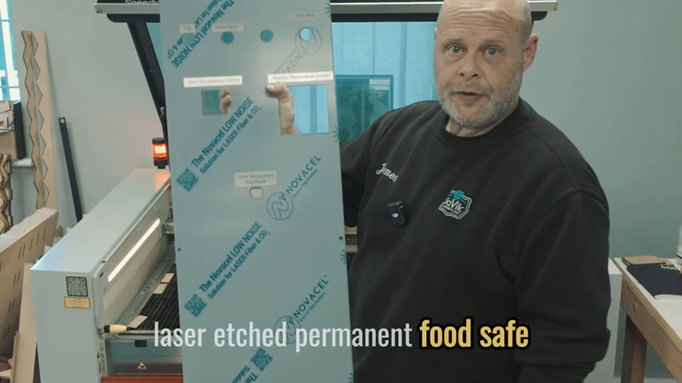
Now that the panel is aligned, it’s time to get rid of the protective film on specific areas where we want to engrave. You might ask, “Why not just peel it all off?” Well, stainless steel is incredibly hard but also surprisingly easy to scratch.
We don’t want to expose the entire surface to knocks, bangs, or scratches during handling.
So, we carefully peel off just the bits we want to engrave — and if you’re a nail-biter, this part is going to be a challenge! Luckily, I’m not, so the peeling goes smoothly.
This selective peeling protects the rest of the panel while preparing the engraving areas perfectly.
Preparing the Panel for Engraving
Step 4: Laser Engraving the Stainless Steel Panel
Laser Engraving the Stainless Steel Panel
Engraving stainless steel with a laser is a multi-stage process. At this point, we hit the engraving button on the machine and let the Trotec Speedy 400 work its magic.
Depending on the material and the type of engraving we want, the machine offers a wide range of settings.
For this panel, we use the high-quality mode, where the laser head moves across the entire width of the panel, not just the text area.
This method gives a much cleaner, tidier, and crisper engraving result on stainless steel, which is critical for a professional finish.
When the engraving is complete, the machine emits what I call the “beep of joy” — that satisfying beep that means the job is done correctly. But hold your horses, we’re not finished yet!
Step 5: Flipping the Panel for Double-Sided Engraving
We need to engrave the bottom of the panel as well, so it goes back into the machine.
We use the same file but switch to the next drawing for the bottom part. By snapping the design back to our trusty guidelines, we ensure perfect alignment.
Yes, the panel goes in upside down — but that’s the upside down we want! We close the lid and do another alignment check with the laser’s red dot.
It’s a bit boring, but trust me, it’s worth it. Nothing’s moved; everything is locked in place, and we’re ready to go.
Flipping the Panel for Double-Sided Engraving
I always test before hitting the final “go.” It’s nerve-wracking because once the engraving starts, there’s no going back. But thanks to the guidelines and careful setup, the alignment is perfect.
Step 6: The Final Engraved Panel
The Final Engraved Panel
And there you have it — a beautifully laser-etched stainless steel panel, permanent, food safe, and ready for use.
The laser marking is crisp and precise, with no scratches or blemishes thanks to the careful handling and selective film removal.
Of course, when we’re running wholesale orders, that “beep of joy” becomes a constant companion — beeping every two and a half minutes from 8 am to 5 pm.
It’s the worst beep test in the world, but it means the job is done right, every time.
Final Thoughts
Laser marking, laser engraving, and metal marking stainless steel require precision, patience, and a bit of practice — not to mention the right equipment. The Trotec Speedy 400’s pass-through capability and advanced software make large-scale jobs manageable without sacrificing quality.
From careful alignment to selective film removal and multi-stage engraving, every step matters to get those crisp, permanent markings. And remember, a little humour and patience go a long way — especially when you’re hearing that beep every few minutes!
For anyone interested in industrial laser engraving or metal marking on stainless steel, I hope this guide sheds some light on the process and inspires you to tackle your own big jobs with confidence.
Stay tuned for more laser adventures, and if you want to see this process in action, check out Javik Laser Ltd‘s original content for satisfying laser engraving videos and tips.
Explore More About Laser Marking and Engraving
If you’re eager to deepen your knowledge about laser marking, laser engraving, or metal marking stainless steel, there are numerous resources and tutorials available online that can help you master these techniques. Learning about different types of lasers, settings, and materials can significantly improve your results.
Consider visiting sites dedicated to industrial laser technology, where you can find detailed guides, video demonstrations, and user forums. These platforms often share tips on optimizing laser settings for stainless steel, troubleshooting common issues, and exploring advanced engraving methods.
Laser marking, laser engraving, and metal marking stainless steel require precision, patience, and a bit of practice — not to mention the right equipment. The Trotec Speedy 400’s pass-through capability and advanced software make large-scale jobs manageable without sacrificing quality.
From careful alignment to selective film removal and multi-stage engraving, every step matters to get those crisp, permanent markings. And remember, a little humour and patience go a long way — especially when you’re hearing that beep every few minutes!
For anyone interested in industrial laser engraving or metal marking on stainless steel, I hope this guide sheds some light on the process and inspires you to tackle your own big jobs with confidence.
Stay tuned for more laser adventures, and if you want to see this process in action, check out Javik Laser Ltd‘s original content for satisfying laser engraving videos and tips.
For more information on Laser Marking, Laser Engraving, and Metal Marking Stainless Steel: A Step-by-Step Guide with the Trotec Speedy 400 talk to Javik Laser Ltd